AFM for Azure Ingress/Egress traffic filtering and VPN tunneling > Class 1: AFM for Azure Ingress/Egress traffic filtering and VPN tunneling Source |
Configure VPN Tunnel
Plan VPN Deployment to outside VNET using an Azure VPN gateway on the remote end (IP Overlap Scenario)
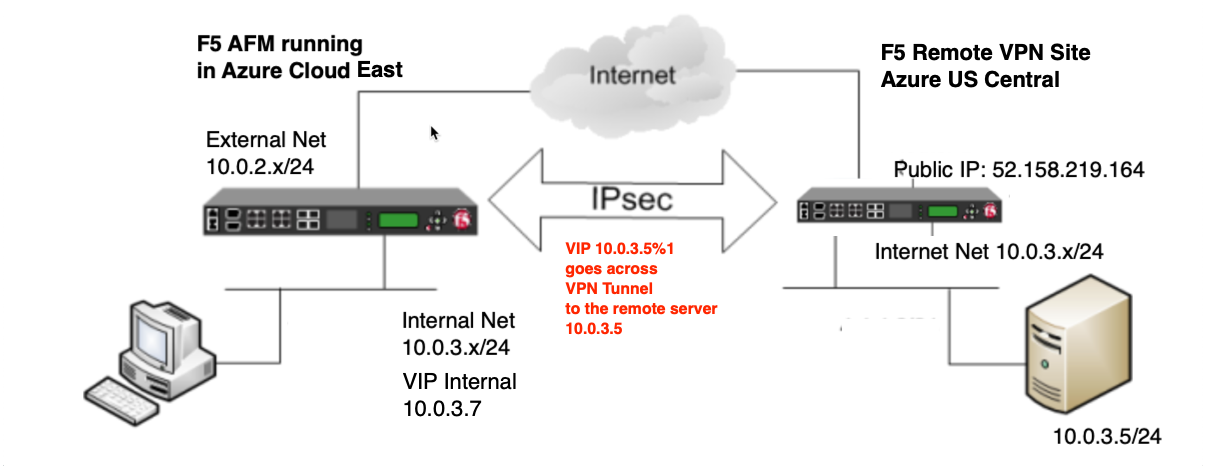
- Discuss hard requirements (IKEv2 in VTI mode seems to work best with Azure currently)
- In most F5 deployments IKEv2 is far more stable, and VTI's are the most reliable when it comes to interoperability/stability
- Discuss RD functionality as well as the requirement for strict isolation being off
- If we are dealing with IP overlaps we have to use RD's with strict isolation off. We can then use LTM with proper virtuals/snat pools to get the traffic flowing between overlapping networks for desired services much like Policy NAT, but with more flexibility.
- Discuss how SNAT is required and the specifics around using SNAT to swing traffic between RD's when IP overlap is present
- Without SNAT we cannot obfuscate the overlapping source/dest IP's between the RD's and the solution would not function.
- Discuss how the virtuals will work to get traffic flowing for desired services.
- The virtuals with cross RD snat applied allow the F5 to broker connections between overlapping IP space by virtual of being able to manipulate src/dst IP's between the RD's
Required Information
| Name | IP Address | Note |
|---|---|---|
| REMOTE VPN ENDPOINT | 52.158.219.164 | public dest for IPSEC |
| EXTERNAL SELF PRIVATE | 10.0.2.4 | local source for IPSEC |
| EXTERNAL SELF PUBLIC | used as IPSEC ID | |
| INTERNAL SELF | 10.0.3.4 | local source for IPSEC |
| INTERNAL VIP | 10.0.3.7 | Internal VIP (VPN) |
| App1 | 10.0.3.5 | NAT target and pool (VPN) |
| App2 | 10.0.3.6 | NAT target and pool (VPN) |
Deploy said VPN
Validate BIG-IP for VPN termination (Thiis should be completed after the previous exercise BIG-IP Base Configuration) Reference IP Table for the below IP
Create RD1 for routed tunnel to exist inside of and disable strict isolation in RD0.
create net route-domain 1 strict disabled description "RD1 for VPN Termination"
modify net route-domain 0 strict disabled
Create VPN configuration
- create IPsec policy and traffic selector for interface mode
create net ipsec ipsec-policy VPN_IPSEC_POLICY { protocol esp mode interface ike-phase2-auth-algorithm sha256 ike-phase2-encrypt-algorithm aes256 ike-phase2-perfect-forward-secrecy modp2048 ike-phase2-lifetime 1440 ike-phase2-lifetime-kilobytes 0 }
create net ipsec traffic-selector VPN_RD1_TS { source-address 0.0.0.0/0 destination-address 0.0.0.0/0 ipsec-policy VPN_IPSEC_POLICY }
- create IPsec peer. Replace <EXTERNAL SELF PUBLIC> with associated IP address in the table above
create net ipsec ike-peer VPN_PEER_RD1 { remote-address 52.158.219.164 phase1-auth-method pre-shared-key phase1-hash-algorithm sha256 phase1-encrypt-algorithm aes256 phase1-perfect-forward-secrecy modp2048 preshared-key "RandomGarbage123" my-id-type address my-id-value <EXTERNAL SELF PUBLIC> peers-id-type address peers-id-value 52.158.219.164 version replace-all-with { v2 } traffic-selector replace-all-with { VPN_RD1_TS } nat-traversal on }
- create IPsec tunnels. Replace 10.0.2.4 with EXTERNAL SELF PRIVATE address in the table above if different.
create net tunnels ipsec IPSEC_RD1_PROFILE traffic-selector VPN_RD1_TS defaults-from ipsec
create net tunnels tunnel IPSEC_RD1_VTI profile IPSEC_RD1_PROFILE local-address 10.0.2.4 remote-address 52.158.219.164
- create remote route and assign to vpn route-domain. Replace x with student#...example f5student905 is 5.
modify net route-domain 1 vlans add { IPSEC_RD1_VTI }
create net self IPSEC_RD1_SELF { address 172.31.x.2%1/24 allow-service none vlan IPSEC_RD1_VTI }
create net route IPSEC_RD1_REMOTE_NETWORK { network 10.0.3.0%1/24 gw 172.31.x.1%1 }
Create SNAT Pools for Both RD's. RD0 will require the additional Azure NIC Ip outlined above. Replace x with student# For RD1...example f5student905 is 5. For RD0 this should be 10.0.3.7 if your Internal VIP matches, otherwise use the value from your table.
create ltm snatpool RD1_SNATPOOL { members add { 172.31.x.5%1 } }
create ltm snatpool RD0_SNATPOOL { members add { 10.0.3.7 } }
Create LTM Pools for SSH traffic. Replace 10.0.3.5 and 10.0.3.6 with app1 and app2 IP address from table above if different
create ltm pool RD1_SSH members replace-all-with { 10.0.3.5%1:22 } monitor tcp_half_open
create ltm pool APP1_SSH members replace-all-with { 10.0.3.5:22 } monitor tcp_half_open
create ltm pool APP2_SSH members replace-all-with { 10.0.3.6:22 } monitor tcp_half_open
Create FW Policy
create security firewall policy SSH_VIP rules replace-all-with { ALLOW-SSH { action accept ip-protocol tcp destination { ports add { 22 } } } }
Create VIP for inbound and outbound tunnel access to app servers. Replace x **with **student# For RD1...example f5student905 is 5. For RD0 this should be 10.0.3.7 if your Internal VIP matches, otherwise use the value from your table.
create ltm virtual VS_RD1_SSH-RD0 destination 10.0.3.7:22 pool RD1_SSH source-address-translation { type snat pool RD1_SNATPOOL } profiles replace-all-with { f5-tcp-progressive } fw-enforced-policy SSH_VIP
create ltm virtual VS_APP1_SSH-RD1 destination 172.31.x.10%1:22 pool APP1_SSH source-address-translation { type snat pool RD0_SNATPOOL } profiles replace-all-with { f5-tcp-progressive } fw-enforced-policy SSH_VIP
create ltm virtual VS_APP2_SSH-RD1 destination 172.31.x.11%1:22 pool APP2_SSH source-address-translation { type snat pool RD0_SNATPOOL } profiles replace-all-with { f5-tcp-progressive } fw-enforced-policy SSH_VIP
Validate solution by establishing connection to remote server across vpn tunnel
- From APP1 or APP2. Replace 10.0.3.7 with INTERNAL VIP IP address from table above if different
nc -v 10.0.3.7 22
ssh azureuser@10.0.3.7
- Notify the proctor and the remote side will SSH to your 172.31.x.10/11 VIP's to validate your ingress configuration.
Wrap up and delete resource group
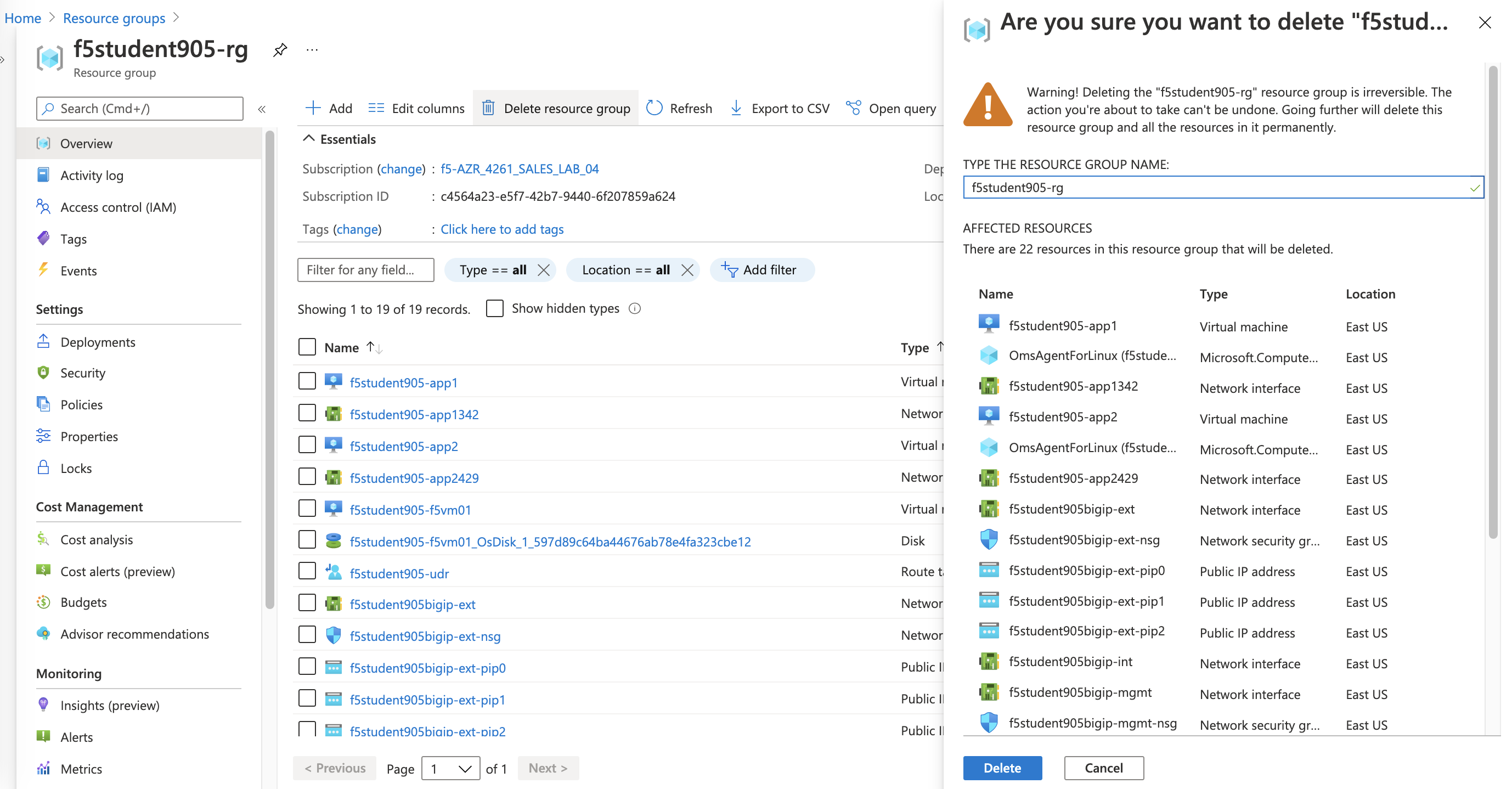
- browse to Azure f5student#-rg and select "Delete resource group"
- enter f5student#-rg and select Delete to confirm deletion of resource group